使用cquery:C++ language server
Table of Contents
更新:我现在用自己的ccls了。
C++代码索引工具现状
Tag system流派
- Universal Ctags很精妙,用正则表达式跳转,因此文档编辑后仍能使用。https://github.com/universal-ctags/ctags/blob/master/parsers/c.c 但不带引用,Vim会用二分查找,大约会有log2(size/4096)次seek。
- Cscope似乎已经荒废了。
- ID Utils
- GNU GLOBAL
libparser/C.c。用Berkeley DB存储definition/reference/path name。带有插件系统可以使用ctags idutils的parser。对于Emacs/Vim用户来说,可能是tag流派中最好用的工具了。辅以一些heuristics和ripgrep等,很多用户不觉得自己生活在水深火热中…… - Elixir Cross Referencer
- OpenGrok
clang流派
- clang-tags荒废。
- YouCompleteMe不够好用,因为只处理单一translation unit,无法查找引用。
- clangd最有前景,有大厂大项目愿意采用,Xcode会用让clangd有助益的libindexstore。但目前尚无存储系统,因此无法处理多translation units。作为clang-tools-extra一部分,而clang+llvm构建/贡献门槛高([https://reviews.llvm.org/])。对于这类工具类应用,贡献难易程度是个重要因素。目前有尝试引入存储模型(MarkZ3),但目前设计较为复杂,而实际上不带garbage collection的
std::vector(cquery风格)足够应对大部分使用场景。很担心他们走上歧路。 - Google Kythe,(mostly) language-agnostic,概念复杂,配置困难。不重视language server protocol,当前仅提供
ReferencesProvider,HoverProvider,DefinitionProvider,且交互使用可能有极大延迟。大多数人并不在意C++ Haskell Python代码间无缝跳转。https://github.com/google/kythe/tree/master/kythe/cxx/indexer/cxx - rtags可以查找引用,但每个translation unit 6个文件
info,symbols,symnames,targets,tokens,usrs(过多),没有使用in-memory索引,查找引用请求会读项目所有translation units的文件。导致性能低下https://github.com/Andersbakken/rtags/issues/1007。rtags.el里应该还有很多东西可供Emacs lsp-mode学习,有经验的人介绍一下~ - cquery现阶段的妥协。主要数据结构为不带garbage collection(变量/函数/类型等的id不会回收)的
std::vector(src/indexer.h)。有一些Emacs用户积极贡献code navigation功能。
IDE(Any sufficiently complicated IDE contains an ad-hoc, informally-specified, bug-ridden, slow implementation of half of C++.)
cquery安装、配置
- git clone https://github.com/jacobdufault/cquery
- 构建language server可执行文件(Arch Linux可用aur/cquery-git的
/usr/bin/cquery)./waf configure# 或用--bundled-clang=5.0.1选择http://releases.llvm.org/上的release版本./waf build# 构建build/release/bin/cquery
- 编辑器安装language client插件(Emacs lsp-mode、Neovim LanguageClient-neovim、VSCode安装cquery/vscode-client里的插件)
- 为你的C/C++/Objective-C项目生成
compile_commands.json,参见下文。
cquery是一个C++ language server,它和编辑器端的LSP client协作流程如下:
当编辑器打开C++文件时,language client插件启动language server进程(根据配置的language server可执行文件),用JSON-RPC 2.0协议通过stdio通信,协议规范见https://microsoft.github.io/language-server-protocol/specification。
Language client插件用initialize请求告知language server(这里是build/release/bin/cquery进程)自己支持的功能(ClientCapabilities)、项目路径(rootUri)、初始化选项(initializationOptions,cquery需要知道cacheDirectory路径)。之后各种语言相关功能都通过与language server通信实现:
- 光标移动时向language server发送
textDocument/hover请求,language server返回变量/函数声明信息、注释等。VSCode使用浮动窗口显示,Emacs lsp-mode用eldoc显示 - 查找定义发送
textDocument/definition请求,language server返回定义所在的文件、行列号。编辑器的可能行为:单个结果时直接跳转到目标文件的指定行列,如有多个候选则用菜单显示 - 查找引用发送
textDocument/references请求,和查找定义类似 - 查找当前文档定义的符号(常用与查找顶层的outline)发送
textDocument/documentSymbol请求,language server返回符号和行列号 - 查找项目定义的符号(只查找outline的也很有用)发送
workspace/symbol请求 - 补全
textDocument/completion,language server提供候选及排序方式,是否使用snippet,如何编辑文档得到补全结果等 - 文档编辑操作发送
textDocument/didChange,language server据此更新自己的模型 - cquery还支持一些Language Server Protocol之外的扩展,比如
$cquery/derived用于查找派生的类、方法等
Emacs
参照https://github.com/jacobdufault/cquery/wiki/Emacs配置。需要安装几个插件:
- lsp-mode Emacs里的LSP客户端库,可用于多种language server。另有lsp-rust、lsp-haskell等,可以看作适配器,包含language server相关设置。
- cquery项目中的
emacs/cquery.el。地位与lsp-rust、lsp-haskell等类似,把cquery适配到lsp-mode。另外支持cquery一些Language Server Protocol之外的扩展。 - lsp-ui lsp-mode有计划并入Emacs。其他UI相关或因协议等问题不适合在核心lsp-mode包的组件放在这里。当前有:
- lsp-ui-flycheck 用language server的diagnostics信息实现flycheck的checker
- lsp-ui-sideline 即时显示当前行所有标识符的
textDocument/hover信息
- lsp-ui-peek 基于quick-peek的
find-{definitions,references,apropos}
- 未来可能添加更多code lens功能
- company-lsp company是一个补全引擎,company-lsp为一个backend,用
textDocument/completion信息提供补全
这些插件只有lsp-mode和cquery.el是必须的。
lsp-mode
(lsp-enable-imenu)开启,用imenu来显示textDocument/documentSymbol信息。跳转到当前档案的符号很方便。- 光标移动到标识符上会触发
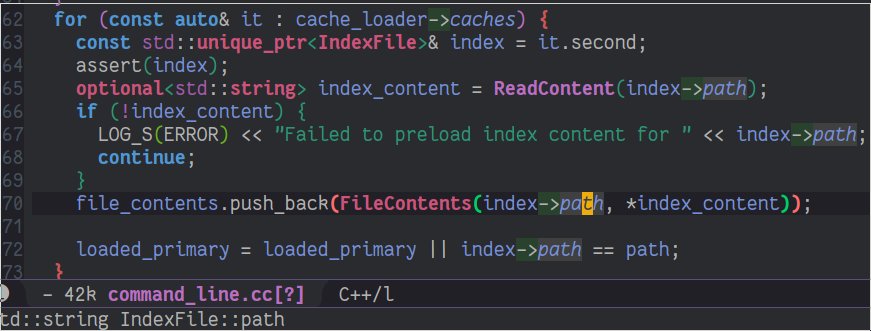
textDocument/hover,显示类型、变量、函数等的fully qualified name,有层层namespace嵌套时容易定位。对于auto specifier,能知道具体类型。 M-x lsp-format-buffer发送textDocument/formatting。参见cquery/wiki/Formatting
xref.el
xref.el是Emacs自带的。lsp-mode设置xref-backend-functions,让xref.el使用lsp后端。如果不安装其他库,也能用以下三个函数,结果由xref.el渲染。
xref-find-definitions(默认M-.),查找定义,发送textDocument/definition请求xref-find-references(默认M-?),查找引用,发送textDocument/references请求xref-find-apropos(默认C-M-.),查找项目符号,发送workspace/symbol请求
xref-find-definitions若只有一个结果会直接跳转,有多个则弹出菜单供用户选择。而xref-find-references会触发xref--read-identifier,在minibuffer中要求读入一个串。这显然和期望的查找当前光标位置引用的使用方式不符。另外,lsp-mode会读取光标处标识符的text properties信息(其中编码了buffer内位置信息),而prompt读入的串是不带text properties的。xref-find-references会失败。
要让它工作,请阅读xref-prompt-for-identifier文档,把xref-find-references添加进xref-prompt-for-identifier。我提交了一个bug到Emacs(因为xref.el是Emacs一部分):https://debbugs.gnu.org/cgi/bugreport.cgi?bug=29619,但maintainer需要了解更多用户的反馈才会修改xref-prompt-for-identifier默认值。
cquery workspace/symbol使用了一个sequence alignment结合词结合性、camelCase等启发因素的fuzzy matching算法,以foo bar为模式会返回fooBar foobar foozbar等,fooBar排在前面。xref-find-apropos会自作聪明地把模式用空格分割后当作正规表达式转义,考虑自定义。
company-lsp
提供LSP的补全支持。我用spacemacs的(spacemacs|add-company-backends :backends company-lsp :modes c-mode-common)。
tumashu写了一个company-childframe.el,可能需要人推动一下company-mode#745。
cquery.el
cquery项目中的cquery.el适配cquery到lsp-mode,同时提供一些LSP协议未定义的功能。如inactive region,把preprocessor忽略掉的行用灰色显示:
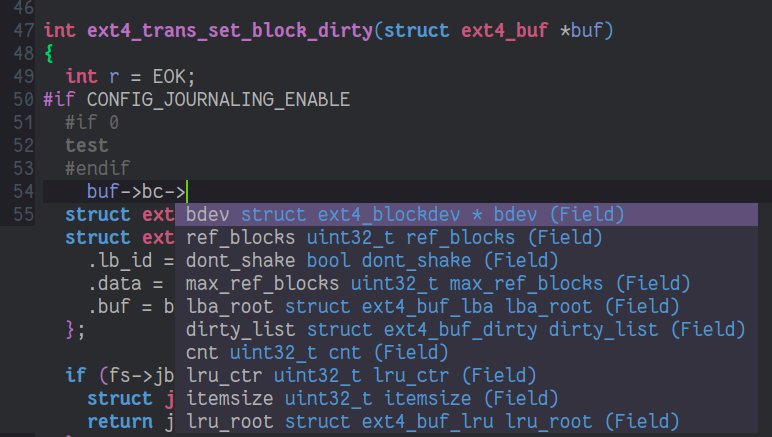
我用以下C/C++ mode hook在项目根目录有compile_commands.json时自动启用`lsp-cquery-enable。
(defun my//enable-cquery-if-compile-commands-json ()
  (when
      (and (not (and (boundp 'lsp-mode) lsp-mode))
           (or
            (cl-some (lambda (x) (string-match-p x buffer-file-name)) my-cquery-whitelist)
            (cl-notany (lambda (x) (string-match-p x buffer-file-name)) my-cquery-blacklist))
           (or (locate-dominating-file default-directory "compile_commands.json")
               (locate-dominating-file default-directory ".cquery")))
    (setq eldoc-idle-delay 0.2)
    (lsp-cquery-enable)
    (lsp-enable-imenu)
    (when (>= emacs-major-version 26)
      (lsp-ui-doc-mode 1))))
另外一些不在LSP协议中的cquery扩展方法,如:
$cquery/base用于类型是查找base class,也可用于virtual function$cquery/derived用于类型是查找derived classes,也可用于virtual function查找被哪些derived classes override$cquery/vars查找一个类型的所有变量
另外有个$cquery/typeHierarchyTree,但还没有人搬到Emacs,用空的话用个画树的库造福其他人~
helm-xref
helm用户可以考虑安装helm-xref,(setq xref-show-xrefs-function 'helm-xref-show-xrefs)即可。xref-find-{definitions,references,apropos}会用helm显示,替代xref.el的界面。
helm-xref效果如图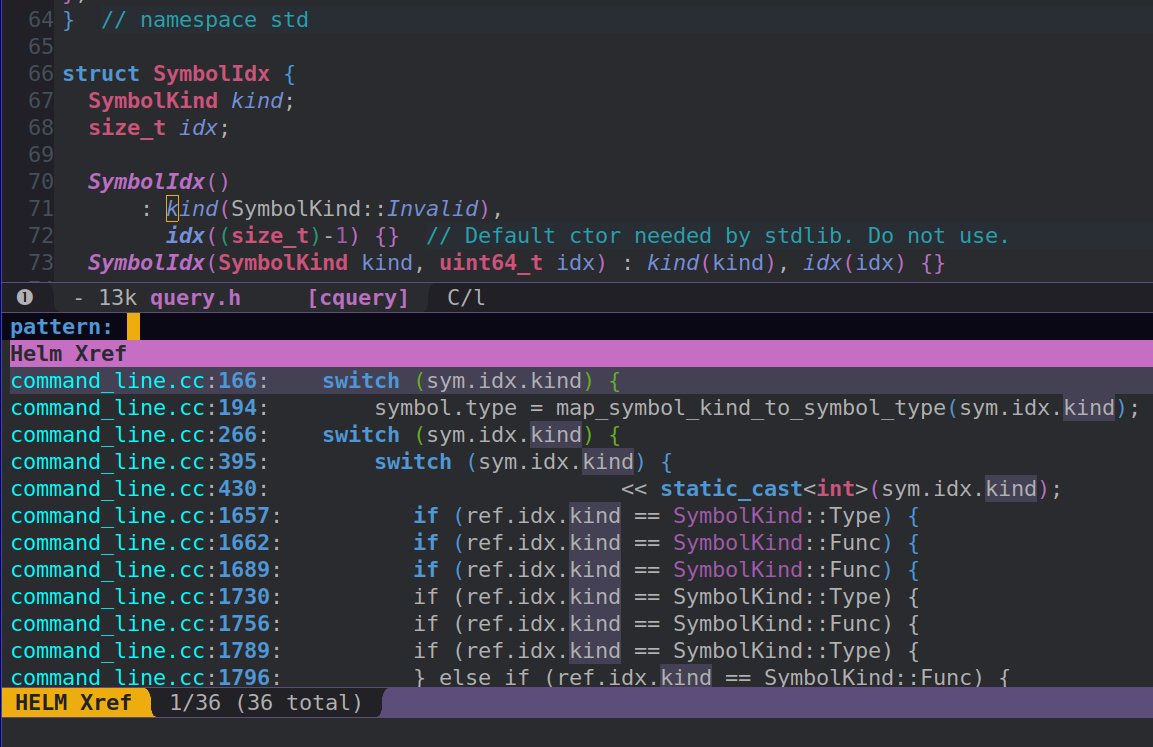 。
。
lsp-ui-doc
使用了child frame,需要Emacs 26或以上。
Language client中命令行设置为cquery --language-server --enable-comments可以索引项目中的注释(文档)。textDocument/hover信息除了提供类型签名,还会提供注释。
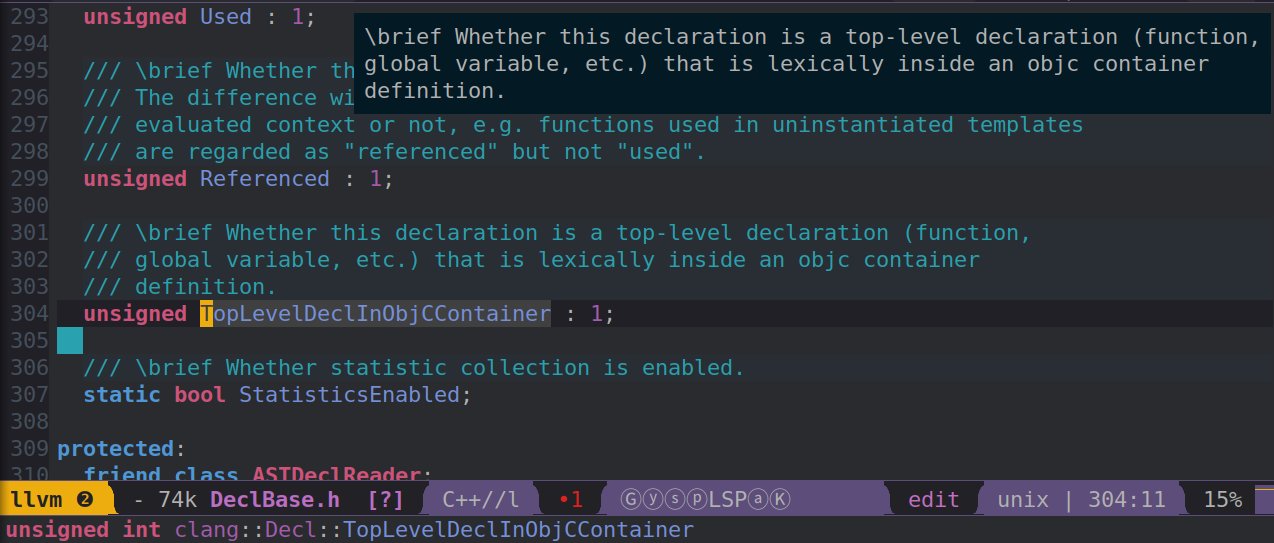
(setq lsp-ui-doc-include-signature nil) ; don't include type signature in the child framelsp-ui-flycheck
(with-eval-after-load 'lsp-mode
   (add-hook 'lsp-after-open-hook (lambda () (lsp-ui-flycheck-enable 1))))
lsp-ui-peek
lsp-ui提供了不同于xref.el的另一套交叉引用。参见其主页的demo。
M-x lsp-ui-peek-find-definitions
M-x lsp-ui-peek-find-references
M-x lsp-ui-peek-find-workspace-symbol

# 不要隐藏非当前文件的匹配项的
(setq lsp-ui-peek-expand-function (lambda (xs) (mapcar #'car xs)))

(define-key lsp-ui-peek-mode-map (kbd "h") 'lsp-ui-peek--select-prev-file)
(define-key lsp-ui-peek-mode-map (kbd "l") 'lsp-ui-peek--select-next-file)
(define-key lsp-ui-peek-mode-map (kbd "j") 'lsp-ui-peek--select-next)
(define-key lsp-ui-peek-mode-map (kbd "k") 'lsp-ui-peek--select-prev)
以下三个cquery扩展协议也很有用,建议设置快捷键。
(lsp-ui-peek-find-custom nil "$cquery/base")
(lsp-ui-peek-find-custom nil "$cquery/callers")
(lsp-ui-peek-find-custom nil "$cquery/derived")
lsp-ui-sideline
(setq lsp-ui-sideline-show-symbol nil) ; don't show symbol on the right of info其他
- LSP生态系统解决的一大痛点是以前对于不同语言,要使用不同工具,设置不同快捷键。用了language client就可以统一了。
注意textDocument/references协议中定义返回结果为Location[] | null,只含位置信息,不包含代码行内容。显示行内容是lsp-mode做的。
我的配置:https://github.com/MaskRay/Config/blob/master/home/.emacs.d/layers/%2Bmy/my-code
- 希望spacemacs支持LSP。
reference-handler(类似于跳转到定义的jump-handler)也很有用:https://github.com/syl20bnr/spacemacs/pull/9911 - lsp-mode和ggtags都会
(setq-local eldoc-documentation-function ...),对于这类minor-mode冲突问题,如果能设置优先级就能优雅解决。
Neovim
参照https://github.com/autozimu/LanguageClient-neovim/wiki/cquery。相关组件:
- LanguageClient-neovim Neovim里的LSP客户端
- denite 提供UI支持,显示LanguageClient-neovim获取的信息
- fzf 提供UI支持
- deoplete nvim-completion-manager 补全UI
- neosnippet 可以和deoplete配合,snippet
- 目前缺乏Emacs中
cquery.el的对应物,提供LSP协议未定义的cquery特定功能
nn <leader>ji :Denite documentSymbol<cr>
nn <leader>jI :Denite workspaceSymbol<cr>
" 终端限制,<C-,>不可用。ord(`,`) & 64为0无法表示
nn <M-,> :Denite references<cr>
nn <silent> <C-j> :MarkPush<cr>:call LanguageClient_textDocument_definition()<cr>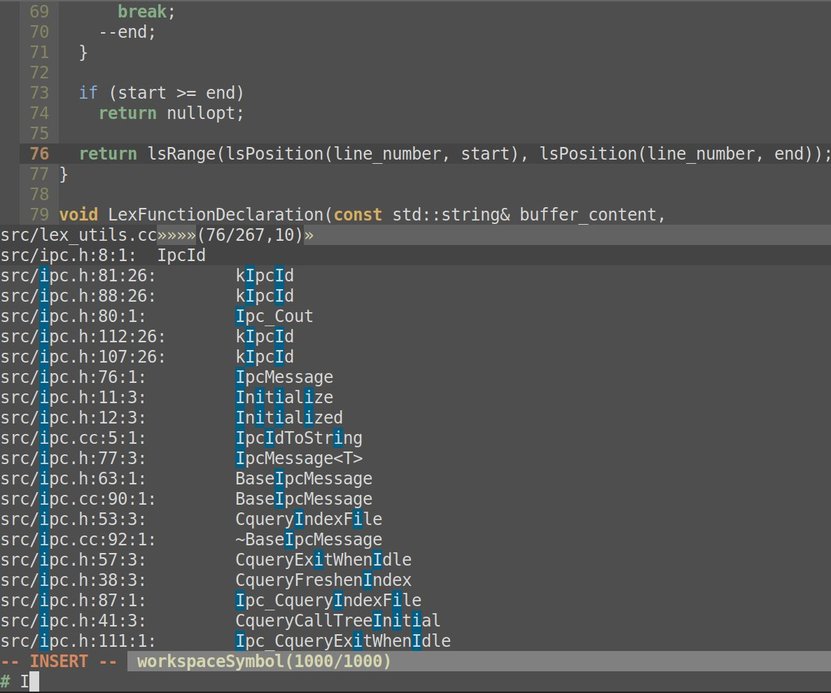 。
。
生成compile_commands.json
cquery这类Clang LibTooling工具和传统tag-based工具的一大差别是了解项目中每个源文件和编译方式。放在项目根目录的compile_commands.json提供了这种信息。
CMake
% mkdir build
% (cd build; cmake -DCMAKE_EXPORT_COMPILE_COMMANDS=YES ..)
% ln -s build/compile_commands.json
Build EAR
Bear is a tool that generates a compilation database for clang tooling. It can be used for any project based on Makefile.
bear make
# generates compile_commands.json
Ninja
ninja -t compdb rule_names... > compile_commands.json深入
cquery使用Clang的C接口libclang parse/index文件。Clang C++ API不稳定,cquery使用C++ API可能会难以适配不同Clang版本。使用--use-clang-cxx编译选项可以用Clang C++ API。但注意可能会显著增加cquery构建时间。Windows releases.llvm.org的bundled clang+llvm不带C++头文件。
--enable-comments可以索引项目中的注释,VSCode渲染完美,但Emacs Vim的显示还在改善中。注释的排版,如何parse comment markers(Doxygen,standardese)还有很多争论。
#include <algorithm> 在include行也能跳转,但如果是项目外的文件(系统头文件),你的LSP client可能不会把它和之前的LSP session关联,你就无法在新打开的buffer中用LSP功能了。
A a; 对于声明/定义,在a上textDocument/definition会跳到类型A的定义。在a旁边的空格或分号会跳到constructor。因为constructor标记为implicit,代码中让implicit函数调用的范围左右扩展一格,那么就更容易触发了。
A a(3); 在 (或);上textDocument/definition会跳到类型constructor。
A a=f(); 如果有隐式copy/move constructor,在(上能跳到它们。
assert(1); 在assert上会跳到#define assert,但在(1)上会跳到__assert_fail,__assert_fail来自assert macro的展开。libclang IndexerCallbacks.indexEntityReference回调会报告来自__assert_fail的引用,因此请不要惊讶。
auto a = std::make_unique<A>(3); make_unique会跳转到constructor,因为src/indexer.cc中对make开头的模板函数有特殊逻辑,会跳到constructor而不是make_unique的定义。
function/class template里有些东西有def/ref信息,但A<int>::foo()等引用跳转不了,是因为模板索引的困难#174。
有余力~请更新https://github.com/jacobdufault/cquery/wiki~
问题
- Task lists https://github.com/jacobdufault/cquery/issues/30 Polish before publishing (to GitHub Marketplace)
- 需要一个妥善的on-disk storage。很多轻量级数据库不支持或有较难处理的问题(如果有需求把现在in-memory+JSON改成有其他存储模型)。注记,
SQLITE_ENABLE_LOCKING_STYLE、flock很难。
其他
索引Linux kernel
wget 'https://git.archlinux.org/svntogit/packages.git/plain/trunk/config?h=packages/linux' -O .config
yes '' | make config
bear make -j bzImage modules
生成3GiB文件。
索引llvm,du -sh => 1.1GB,索引完内存占用2G。
查看LSP requests/responses
sudo sysdig -As999 --unbuffered -p '%evt.type %evt.buffer' "proc.pid=$(pgrep -fn build/app) and fd.type=pipe" | egrep -v '^Content|^$'希望有朝一日Debug Protocol也能获得重视,https://github.com/Microsoft/vscode-debugadapter-node/blob/master/protocol/src/debugProtocol.ts,让realgud轻松一点。
和YouCompleteMe等项目一样,cquery默认下载prebuilt clang+llvm,即.h .so .a。用户不需要编译完整的llvm,开发门槛比clangd低。
哪些源文件处理不好:
- 多executable
- X macros,一份源码多种编译方式
- ODR violation
- self-modifying code
- dlopen
- weak symbol(不知道链接命令)
感谢ngkaho1234。